Excel to Tally (QuickTally)

Excel to Tally in Seconds by 1 click

Excel to Tally (QuickTally)

Excel to Tally in Seconds by 1 click

Excel to Tally in Seconds by 1 click

Compatible with TallyPrime and Tally ERP9

Support No. 93115-22919

AI applied in bank entries, automatically select ledgers from narrations

The Problem

Manual voucher entry is:

  1. Time-consuming
  2. Error-prone
  3. Stressful
  4. Ledger creation during entries
  5. Inefficient for bulk data

If you’re entering 100s or 1000s of vouchers, you’re losing valuable time every day.

The Solution: QuickTally

QuickTally automates Excel to Tally import Vouchers-

  1. Saving time, effort, and money.
  2. No complex setup.
  3. No manual typing.
  4. Just upload Excel
  5.  Post in Tally.

Excel → Tally | Fast • Simple • Reliable


Key Features

✔ Excel to Tally Sales/Purchase 

✔ Excel to Tally Receipt & Payment 

✔ Bank Entries from Bank Statement

✔ Automatic Ledger, Party & Item Mapping

✔ Accurate quantity, rate & tax

✔ Bulk import-upto 5000 entries in 1 click

✔ Error-free & duplication-safe process

Why Choose QuickTally?

  • 🚀 Save up to 90% data entry time
  • ❌ Eliminate manual errors
  • 📊 Faster month-end & GST compliance
  • 💼 Handle large data effortlessly
  • 🔁 Reusable Excel formats
Still doing manual voucher entry in Tally?

That’s old-school. Automate it now.

✅ Post Excel to Tally in seconds✅ Import Vouchers effortlessly ✅ GST, Ledgers & Item Details✅ No typing • No errors • No stress✅ Create missing ledgers ✅ Modify/Alter all ledgers in 1 click

How it works (Only 3 Steps)

Step 1: Prepare your data in Excel
Step 2: Upload Excel file in QuickTally
Step 3: Post in Tally — Done in seconds

Excel → QuickTally → Tally


📊 What You Get

✔ Faster accounting process
✔ Clean & accurate Tally data
✔ Stress-free bulk voucher handling
✔ Professional automation solution


📊 Handle 100s or 1000s of vouchers with one click


Basic Version 0.4.5

1. Sales & Purchase Entries
2. Receipt & Payment Entries
3. Bank Entries from Bank Statement
4. Credit Note and Debit Note Entries
5. Journal and Contra Entries
6. Single Entry with multiple Ledgers
7. Create Ledgers with GST No. etc
8. Create Ledger Groups
9. Alter all Ledgers in Tally in 1 click
10. Import from Templates and post in Tally
11. Create missing Ledgers from Entries
12. All Templates are built in Application
13. Auto select Ledgers from Bank Statement
14. Join different Narrations into one and post with Entries

Stock Version 0.4.5

1. All Features of Stock Version and

15. Post Entries with Inventory
16. Create Stock Items in 1 click
17. Create Stock Group
18. Create Units
19. Create Missing Stock Items in 1 click
20. Godown wise Entries

Professional Version 0.4.5

1. All Features of Stock Version and

21. Post Entries from GSTR-2A Excel File
22. Post Entries from GSTR-2B Excel File
23. Bill-wise Entries
24. Cost Centre Allocation
25. Post Inventory with GSTR-2A-2B Entries

E-Commerce Version 0.4.5

1. All Features of Professional  Version and

26. E-Commerce-B2B Entries
27. E-Commerce-B2C Entries
28. Auto Select Ledgers as per of GSTN of buyers
29. Create missing Ledgers from all Entries
30. Bifurcate Sales Rate-wise automatically
31. Select Sales and GST Ledgers as per Tally
32. Post Entries with Inventory also

Features of Excel to Tally in Seconds (QuickTally)

220
219
222
213
218
214
216
212
211
217
221
215
240
232
231
236
235
226
238
225
222
229
237
230
239
220 219 222 213 218 214 216 212 211 217 221 215 240 232 231 236 235 226 238 225 222 229 237 230 239

Post Entries

1. Sales & Purchase Entries
2. Receipt & Payment Entries
3. Bank Entries from Bank Statement
4. Credit Note and Debit Note Entries
5. Journal and Contra Entries
6. Single Entry with multiple Ledgers
7. Multiple Entries

Create Masters

1. Ledgers
2. Stock Items
3. Ledgers Groups
4. Stock Item Groups
5. Units
6. Alter Ledgers

Features

1. Post Entries from Excel to Tally in Seconds in 1 click
2. Just Copy, Paste and “POST” into Tally
2. Import from Templates and “POST” in Tally
3. Import from Bank Statement and “POST” in Tally
4. Create Stock Items with HSN, opening Qty, Rate, Unit etc
5. Entries with or without Inventory
6. Post Sale/Purchase Entries as Invoice or as Voucher
7. Entries of Sale/Purchase with Place of Supply also.
8. Entries for unlimited years
9. This Application works upto 20,000 Ledgers in Tally


10. Unlimited entries with a batch of 5,000 entries
11. No renewal fees required to pay
12. One year online support from date of purchase
13. Bill-wise and cost Centre Allocation with Enries
14. Compatible with TallyPrime and Tally ERP

Smart Features

1. Alter All Ledgers in Tally with GST No, Address etc in 1 click
2. All Templates are built in the Application
3. It can “POST” upto 20 ledgers in a each entry
4. Search and Create Missing Ledgers in all entries in 1 Click
5. Check GST Number for errors
6. Errors are shown before Posting the entries
7. “Copy and Paste upto Last Entry” feature
8. Use it for a single entry with 100s ledgers
9. Dates are checked to avoid wrong dates
10. Round off amounts upto 2 decimal
11. No need to go online or generate xml file
12. No expiry of this Application
13. Join different narrations into one and “POST” with entries
14. Convert Negative Amounts into Positive Amounts with Dr/Cr
15. Auto creation of Ledgers, Stock Items and Groups before “Posting” Entries
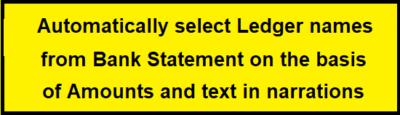
16. Automatically select Ledger names from Bank Statement on the basis of Amounts and text in narrations

14 Blank and 14 Sample Templates are built in this Application for:-

1. Sales Entries in Horizontal Format
2. Sales Entries in Vertical Format
3. Purchase Entries in Horizontal Format
4. Purchase Entries in Vertical Format
5. Receipts Entries
6. Payments Entries
7. Journal Entries

8. Multiple voucher Entries
9. Bank-1 (if Amount in 1 Column)
10. Bank-2 (if Amount in 2 Columns)
11. Single Entry with multiple Ledgers
12. New Ledgers with HSN etc
13. New Stock Items
14. Inventory Entries for Sale and Purchase

excel to tally, excel to tally quick account, tally to excel power query, easy way to tally in excel, excel to tally erp 9, excel tally, excel running tally, excel running tally formula, excel to tally software, excel to tally software price, excel to tally sales with inventory, excel to tally software free, excel to tally, excel to tally sales import,excel to tally stock item import, excel to tally sales without inventory, excel to tally software free download full version, excel to tally software free download, excel to tally erp 9 software free download, excel to tally import software free download, excel to tally prime free software, excel to tally xml converter software free download, excel to tally tool free software, excel to tally erp 9 converter software free download, best way to tally in excel, excel formula for tally marks, how to tally percentage in excel, excel to tally sales voucher import, import sales from excel to tally prime, import sales voucher from excel to tally tdl, import sales voucher from excel to tally.erp 9 gst, gst sales import from excel to tally, import sales voucher from excel to tally.erp 9, how to import sales data from excel to tally prime, how to export sales data from excel to tally, stock item import from excel to tally tdl free download, stock item import from excel to tally prime tdl free download, stock item import from excel to tally prime, how to import invoices from excel to tally, import stock items from excel to tally tdl, can we import excel data in tally, how to create inventory in tally erp 9, tally items in excel, can you keep a tally in excel,inventory not showing in tally erp 9, best software for excel to tally, tally software installation charges, best tally software,excel to tally free software download, excel to tally import software free download full version,excel to tally software free download, excel to tally utility free download, excel to tally

TallyPrime, Tally Entries, Tally Prime, Excel to Tally, Excel to Tally converter, Create Ledgers Excel to Tally, Free Excel to Tally, Import Excel to tally, Excel to tally tool, download Excel to tally, Excel to Tally, Excel to Tally import, convert Excel file to tally, Excel to Tally Directly, Post entries from Excel to Tally, Excel to Tally Directly, Excel to Tally Ledger creation, Excel to Tally Application, ODBC Setting in Tally, Entries from Excel to Tally, quick account, quick tally, quick 2 tally, tally TDL, tdl, customised tally, custom tally, gstr 1, gstr 3b, gst return, tally converter excel to tally import, excel to tally software, excel to tally import utility crack, excel to tally data import utility excel to tally import template download, excel to tally prime import, excel to tally converter excel to tally import tdl free download, excel to tally xml converter, how to import data from excel to tally, how to import sales data from excel to tally, nikash excel to tally, how to import data from excel to tally prime, quick account excel to tally, how to export excel to tally, bank statement import from excel to tally prime, convert excel to tally xml, how to export excel to tally prime, how to import file from excel to tally, excel how to tally cells with text, excel how to tally a column, excel how to tally words, excel file import to tally prime, excel file import to tally, excel how to tally data, excel how to tally marks